¶ The role of relays in the Pareto client
Relays are the backbone of the nostr protocol.
Relays are the lean servers that store nostr data, such as articles, and deliver them on request. The data is read from the inbox relays and written to the outbox relays. Inbox and outbox relays can be the same. However, they can vary for special scenarios.
Some functions may not work as desired if the necessary relays are not set in the client. To avoid this, we recommend the following configuration in the Pareto client and show how to set these.
This article also contains further information and links on the subject of relays in general, their tasks and functions.
We recommend using the following relays to start in the Pareto Client:
wss://nostr.pareto.town
wss://nostr.pareto.space
wss://pareto.nostr1.com
wss://relay.nostr.band
wss://relay.damus.io
wss://nos.lol
wss://offchain.pub
wss://nostr.wine
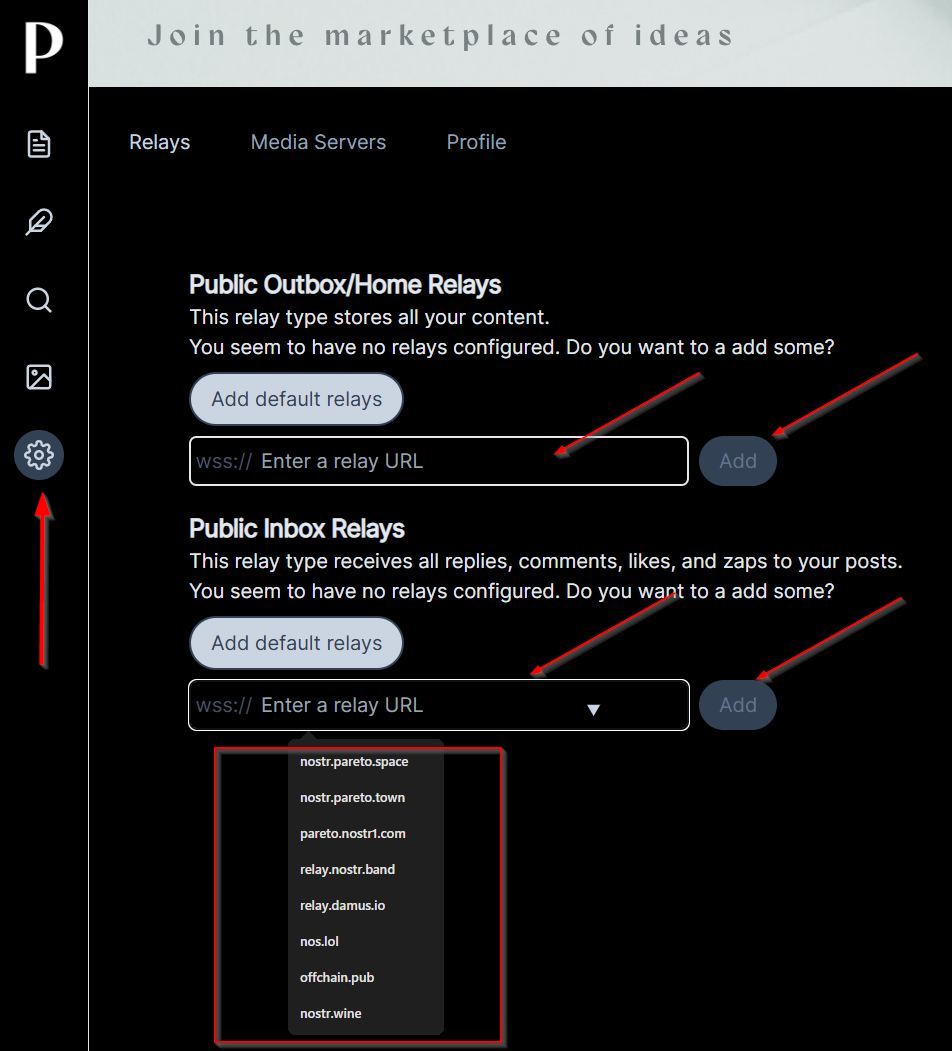
The setting is made in the Pareto client on the left-hand side “Settings” (gear wheel), then the relays appear in the main area or by clicking on this link:
https://pareto.space/settings?category=relays
If no relays have been configured yet, the recommended relays can be adopted via dropdown for Public Outbox / Home Relay as well as in the Public Inbox Relays section by clicking on each individual entry and then clicking on “ADD”:
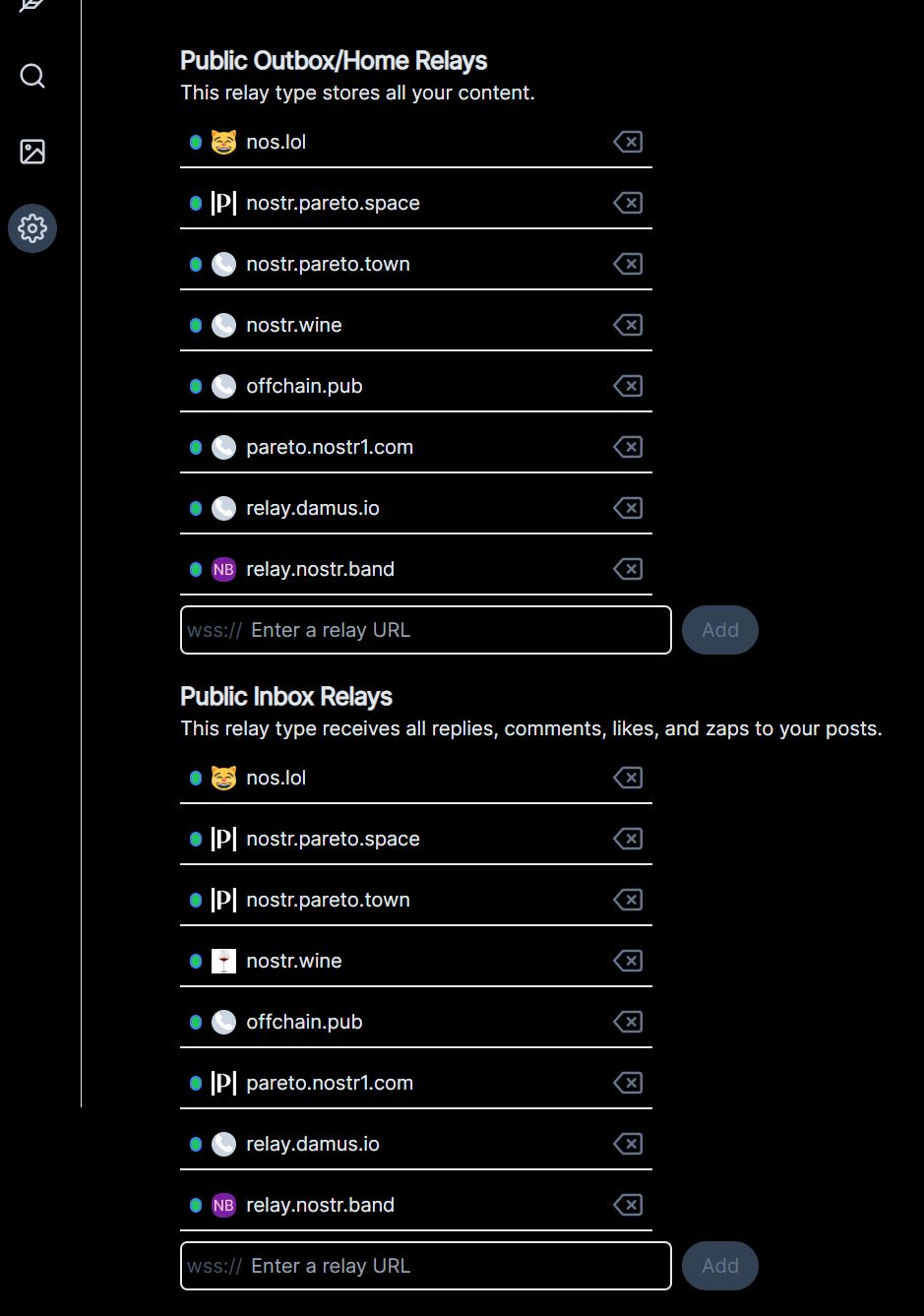
As a result, all eight recommended relays are then entered in both sections:
¶ Function of Nostr relays
Relays are the server components of the decentralized Nostr protocol. They perform the following main tasks:
Storage and forwarding of messages: Relays receive, store and distribute Nostr “notes” (posts, messages, interactions) to all connected clients.
Decentralized infrastructure: In contrast to centralized platforms (such as Twitter), there is no single point of failure. Anyone can operate a relay, which makes censorship more difficult.
Arrival: sunday late afternoon
Redundancy and reliability: Users can use several relays at the same time to prevent data loss.
Differences between relay types
¶ Public relays
are free of charge and are often operated by enthusiasts.
Advantages:
- Easy to get started
Disadvantages:
- Higher risk of spam
- Slower performance
¶ Private relays
Only for selected users (e.g. own instance or circle of friends).
Advantages:
- Control over data
Disadvantages: - Operating costs
- Lower range
¶ Paid relays
are monetized services with fees.
Advantages:
- Better performance
- Spam protection
Disadvantage:
- Chargeable
¶ Whitelist relays
Only for authorized users/content.
Advantage:
- Targeted moderation
Disadvantage:
- Limited openness
Important aspects for selection
Redundancy: Use several relays to cushion failures.
Cost model: Free relays are common, but paid versions often offer better quality.
Location/topic focus: Some relays are regionally or content-specialized.
A current relay list with performance data can be found here, for example: https://legacy.nostr.watch/relays/find
¶ Differences between outbox, inbox and DM relays
Nostr relays can be divided into different categories according to their specific mode of operation, including outbox, inbox and DM relays.
¶ Outbox relays
Function: Save and distribute public notes (posts, likes, reposts) to all connected clients.
Features:
- Publicly accessible, often free of charge
- Data can be retrieved by anyone who queries the relay
Examples: wss://relay.damus.io, wss://nos.lol.
¶ Inbox relays
Function: Specialized in the management of private or partially private data, e.g. for certain user groups or use cases.
Features:
- Restricted access: Often only usable for authorized pubkeys or after whitelisting
- Special event types: Process e.g. encrypted DMs (child 4), poison wrapped events or other user-defined messages
Example: A prototype inbox relay such as nostr.wine only allows queries of events in which the user is mentioned as a p-tag.
¶ DM relays (direct message relays)
Function: Exclusively optimized for encrypted direct messages (child 4).
Features:
- Privacy focus: DMs are only relayed between sender and recipient
- Authentication requirement: Clients often have to log in with AUTH tokens to retrieve messages
Deletion functions: Some relays automatically delete reported spam messages (e.g. Kind 1984).
¶ Outbox:
Public, typical events: child 1 (notes), 7 (reactions) for general social interactions
¶ Inbox:
Restricted, typical events: child 4 (DMs), 1059 (Giftwrap) for private communication
¶ DM Relay
Authorized users only, typical events: child 4, 1984 (spam message) for secure 1:1 communication
For redundancy, users should combine several outbox relays.
Inbox/DM relays are suitable for confidential data, but often require manual configuration.
¶ Further information using the example of Amethyst
There is an article on Pareto by Vitor Pamplona, in which relays are explained using the example of the client Amethyst (for Android). Amethyst uses much more granular settings than most other nostr clients: